Showing posts with label Electronics. Show all posts

Friday, June 25, 2021

Transistor Final Pemancar FM

Brik FM sangat populer di sekitar tempat tinggal saya pada sekitar akhir 1990an. Paling lazim saat itu, transistor yang digunakan adalah C930, C2053 dan C1970. Saya sendiri dulu pernah membuat paling besar menggunakan transistor penguat final C1971. Belakangan, saya baru tahu dari datasheet kalau C1971 bisa mengeluarkan daya maksimum hingga 6 watt. Nah, kalau anda ingin membuat pemancar dengan daya yang lebih tinggi, berikut ini daftar transistor power yang bisa dipilih.


2sc930        100MHz        0.12W        20V

Mpf102

Bf245

Bf224

2n3904

2n2222

2sc2053         175MHz      0.15W        13.5V

2sc1970        175MHz       1W        13.5V

2N4427         175MHz        1W        20V

2sc1971         175MHz        6W        13.5V

MRF237     225MHz           8W        18V

2sc1972        175MHz        14W        13.5V

RD15HVF1  175MHz        15W        12.5V

2sc1946        175MHz        28W        13.5V

2sc2540        175MHz        40W        13.5V

2sc2630        175MHz        50W        12.5V

2sc2694        175MHz        70W        15.2V


2sc2782        175MHz        80W        12.5V

MRF247      175MHz         75W        12.5V

MRF173       150MHz        80W        28V

MRF317       150MHz        100W      28V

MRF171       200MHz        115W        28V

MRF150       150MHz        150W         50V

MRF151       175MHz        150W         50V

MRF6VP11KHR6  130MHz    1000W    50V

MRFX1K80H        175MHz       1800W      65V


Thursday, June 17, 2021

FM Tuner Circuit

This circuit is an easy to built FM tuner. By connecting the output to the FM demodulator, it can receive a wide selections of broadcast station.

Source:

Wednesday, March 18, 2020

BJT Analog Switch


Fig. 1. Simulation result with ltspice (click to enlarge)

Friday, February 21, 2020

Supplier Komponen Elektronik di Surabaya


Dari hasil survey kami untuk mendapatkan komponen yang tersedia di pasaran, kami merekomendasikan beberapa toko penyedia komponen. Beberapa toko tersebut kami rekomendasikan berdasarkan kualitas pelayanan dan harga serta ketersediaan komponen.

1. Khanif
      Jl. Klampis Ngasem No. 3
Telp. 031- 5938187
Surabaya - 60117
Untuk komponen biasa dan pembelian eceran, kami biasa mencari di Khanif Electronic. Ketersediaan komponen tidak terlalu lengkap dan sering kali kehabisan stok, tetapi harganya boleh dibilang murah dibandingkan toko lain. Toko ini cukup terpercaya dan memiliki banyak pelanggan dari kalangan teman-teman mahasiswa. Komponen yang  kami dapatkan di sini yaitu heatsink, beberapa ukuran resistor 5W, optocoupler, beberapa jenis mikrokontroler, resistor dan kapasitor biasa, transistor, beberapa jenis IC logika dan analog, dan beberapa peralatan pelengkap. Toko ini adalah yang selalu kami tuju pertama kali bila komponen yang kami perlukan tersedia di sana.
Kami merekomendasikan toko ini untuk pembelian komponen eceran.

2. Disco Electronic
Jl. Pacar Keling 24B
Surabaya
Secara umum persediaan komponen lebih lengkap daripada di Khanif, tetapi harganya sedikit lebih mahal. Untuk penelitian kami yang paling belakangan, kami mendapatkan list transistor tegangan tinggi. Setelah kami cocokkan dengan datasheet lalu membeli beberapa yang tersedia. Toko ini juga menyediakan kawat tembaga berlapis email dan pelat alumunium, meskipun harganya relatif mahal. Heatsink yang tersedia juga lebih banyak pilihan daripada di khanif. Biasanya kalau kami agak enggan berkeliling ke pasar Genteng, kami coba menanyakan di   toko ini. Komponen yang tersedia di sini antara lain resistor dan kapasitor biasa, kapasitor tegangan tinggi, kapasitor AC, transistor lebih lengkap dari Khanif, IC logika dan analog, transistor tegangan tinggi, mosfet daya, pelat alumunium, kawat email, PCB fiber no.2. Tawar-menawar harga bisa dilakukan bila komponen dibeli dalam jumlah yang banyak.
Kami merekomendasikan toko ini untuk pembelian komponen eceran yang tidak ada di Khanif.

3. Plaza Electronic
Plaza Electronic terletak di Pasar Genteng lantai 2. Papan tulisan Plaza Electronic sudah rusak. Kami ingat Plaza Electronic terletak di depan Mahkota Electronic. Yang lebih menyulitkan, di nota pembelian dari Plaza Electronic tidak ada kop toko sehingga agak sulit dilacak. Namun demikian, kami katakan bahwa Plaza Electronik adalah toko yang paling kami rekomendasikan. Komponen yang tersedia cukup lengkap dengan harga yang murah. Untuk pembelian satu jenis komponen dalam jumlah banyak (di atas Rp. 50.000 atau di atas 10 buah ) kami diberi harga lebih murah tanpa adanya tawar menawar. Komponen yang bisa didapatkan yaitu mata bor, kapasitor biasa maupun tegangan tinggi, resistor dijual per pack, transistor, mosfet, IC logika dan analog.
Kami merekomendasikan toko ini sebagai tujuan pertama di Pasar Genteng.

4. San
Pasar Genteng Baru
Lt. II Blok AD No. 3-6
Surabaya
Komponen yang tersedia di San juga cukup lengkap, tetapi beberapa komponen bahkan lebih mahal dari Khanif. Tetapi tawar menawar harga dapat dilakukan untuk pembelian dalam jumlah banyak. Dengan demikian toko ini tetap lebih kami rekomendasikan daripada toko lain. Komponen yang bisa didapatkan di sini antara lain relay, kapasitor non polar kertas dan keramik, IC, transistor, konektor, resistor dijual per  biji, dioda.
Kami merekomendasikan toko ini untuk komponen yang tidak ada di Plaza Electronic.

5. Pyramid
Pasar Genteng
Lt.2 Blok AC No. 8-9
Telp. 031-5450027 Fax. 031-5458829
Surabaya
Di Pyramid Electronic tersedia berbagai jenis kapasitor dengan berbagai ukuran. Harga satuan terbilang mahal, tetapi bila beli banyak ada potongan harga yang cukup besar. Tentunya setelah tawar-menawar. Selain kapasitor, di toko ini juga kami mendapatkan komponen mosfet, transistor IC dan dioda yang kesemuanya terbilang lengkap. Pyramid Electronic tidak menjual resistor.
Kami merekomendasikan toko ini untuk komponen kapasitor. Juga mosfet dan dioda jika tidak ditemukan di toko lain.

6. Eltech
Email:Eltech@indosat.net.id
Website:www.eltech.co.id
Telp. (031) 531-6320. 546-3008
Fax. (031) 355-0175
Eltech terlatak di Pasar Genteng lantai 2. Eltech menyediakan berbagai komponen digital, terutama IC digital. Modul rangkaian jadi dan power supply juga tersedia di sini. Harga yang ditawarkan bervariasi, untuk komponen digital harganya standar. Ada dua toko Eltech masing-masing terletak di pasar genteng dan di pertokoan Mangga Dua Wonokromo. Harga di Eltech mangga dua relatif lebih murah daripada Eltech Genteng.
Kami merekomendasikan Eltech untuk komponen mikrokontroler dan komponen pendukungnya.


7. Jupiter
PS. Genteng
Lt. II Blok. AC-03-04
Telp (031) 6041 8887
Surabaya
Jupiter menyediakan PCB polos dengan berbagai jenis dan ukuran. Selain itu di sini juga tersedia beberapa komponen bekas yang sudah langka.
Kami merekomendasikan Jupiter untuk PCB polos.

8. Eltra
Pasar Genteng Baru
Lantai 2 – W, 5
Surabaya
Eltra terletak di Pasar Genteng lantai 2 dan 3. Eltra lantai 3 menyediakan kabel dan kawat tembaga berlapis email. Sedangkan eltra lantai 2 menjual baut dan konektor serta menerima pemesanan pembuatan trafo. Harga pesan trafo step up 1A 2000 Volt sekitar Rp. 2.000.000,- sedangkan untuk 0,5A sekitar Rp. 1.250.000,-.
Kami merekomendasikan toko ini untuk pembelian kabel, kawat email, konektor, pemesanan Trafo dan Induktor.

9. Mahajaya Electronics
Pasar Genteng Baru
Lantai II Blok V No. 6-7
Telp. (031) 5313619
Surabaya
Harga di Mahajaya secara umum lebih mahal daripada toko yang telah disebutkan di atas. Tetapi beberapa komponen tidak ditemukan di toko lain dan hanya ada di sini. Mahajaya terletak di pasar genteng lantai 2. Mahajaya menyediakan berbagai jenis resistor, induktor dan kapasitor dan komponen-komponen analog dengan sangat lengkap.
Kami tidak merekomendasikan Mahajaya selama komponen yang dicari ada di toko lain.

10. Sinar Lestari Electric
Jl. Jagalan 27
Telp. (031) 5353993-994
Fax : (031) 5354007
Surabaya
Kami mendapatkan Box panel di toko Sinar Lestari. Toko ini terletak di Jl. Jagalan sedangkan gudangnya terletak di Siwalankerto. Toko ini melayani pemesanan Box sesuai keinginan kita. Saya belum membandingkan harga maupun kualitas barang dari toko ini dengan toko lain. Di Jl. Jagalan banyak toko-toko listrik. Sebagai alternatif, ada juga toko di daerah Pasar Keputran.


11. CV Adi Graha
Jl. Peneleh 126
Telp. 031-5450074
Surabaya - 60274
CV Adi Graha menyediakan berbagai alat-alat elektronik kuno dan antik. Kami menemukan kapasitor yang mirip dengan discharge capasitor flasher dengan kapasitas 1,5 uF 2000 V dengan harga Rp. 850.000,-. Kami merekomendasikan toko ini bila tidak menemukan komponen setelah mencari di seluruh Surabaya.

Demikianlah beberapa toko yang dapat kami rekomendasikan, mudah mudahan informasi ini berguna untuk pencarian spare part atau suplai komponen riset.

Sunday, February 16, 2020

Thursday, February 13, 2020

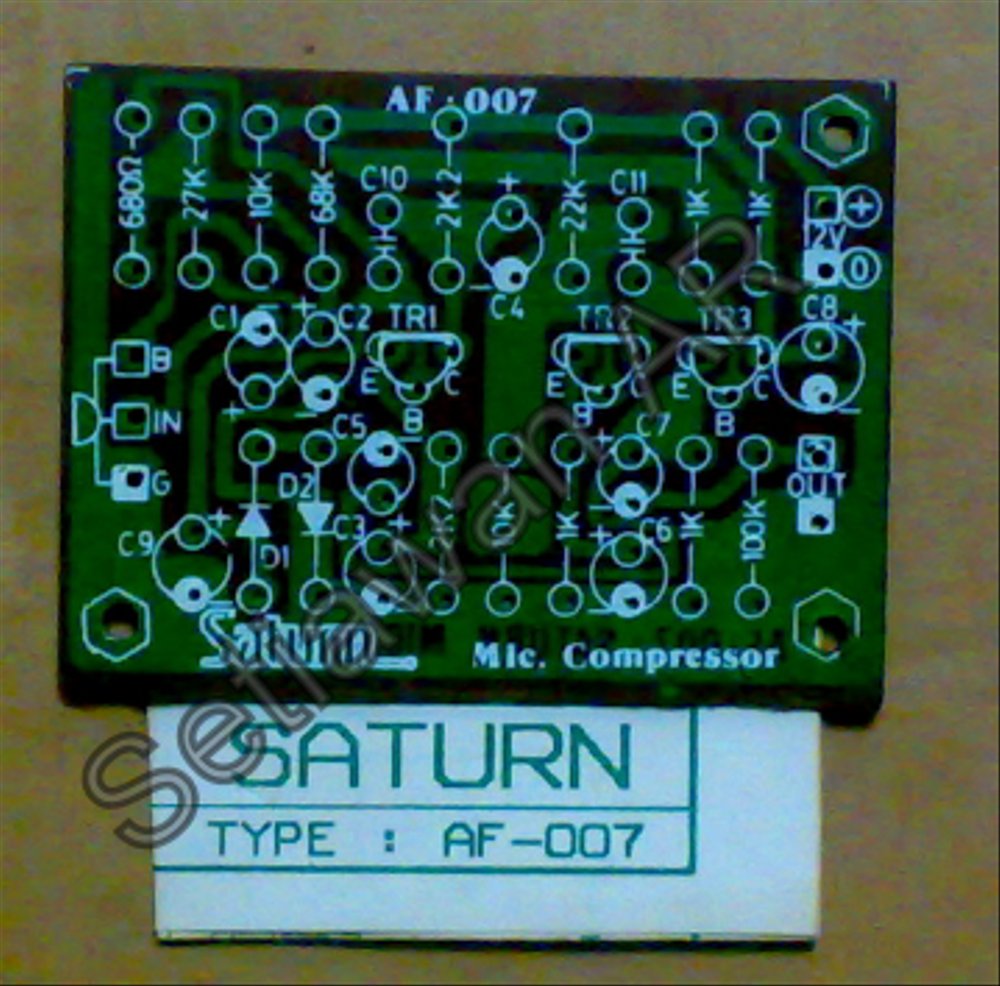
Penguat Mic Bebas Jarak Saturn AF-007


R1: 680R
R2: 68K
R3: 27K
R4, R5: 2K2
R6: 22K
R7, R9. R10, R12: 1K
R8, R13: 10K
R11: 100K
C1, C4: 2,2uF/25V
C2: 4,7uF/25V
C3: 22uF/25V
C5, C7: 1uF/25V
C6, C9: 47uF/25V
C8: 100uF/25V
C10, C11: 120pF
T1, T2, T3: BC547, BC549
D1, D2: IN4148


Wednesday, April 18, 2018

Atmel Studio 7 Set-up for Arduino UNO Programming

Abstract: Arduino Uno is one of the most used boards by beginners to learn embedded systems. The easiest way to program Arduino Uno is to write code in the sketch programming language using the default Arduino software (Arduino IDE). The Arduino IDE interface is very simple and writing programs in sketch is very easy. This is both an advantage and a weakness of programming with the Arduino IDE, where someone who wants to learn more about the microcontroller system will experience difficulties because they cannot see how the processor works more transparently. There are several alternatives to the Arduino IDE for programming in assembly and C / C ++, one of which is Atmel Studio 7.In this paper, I will explain how to set the environment for Arduino Uno programming using Atmel Studio 7 software.

Abstrak: Arduino Uno merupakan salah satu board yang paling banyak digunakan oleh pemula untuk mempelajari sistem embedded. Cara termudah untuk memprogram Arduino Uno adalah dengan menulis code dalam bahasa pemrograman sketch menggunakan software bawaan dari Arduino (Arduino IDE). Interface Arduino IDE sangat sederhana dan menulis program dalam sketch-pun sangat mudah. Hal ini merupakan kelebihan sekaligus kelemahan pemrograman dengan Arduino IDE, dimana seseorang yang ingin mempelajari sistem mikrokontroller lebih mendalam, akan mengalami kesulitan karena tidak dapat melihat cara kerja prosesor secara lebih transparan. Ada beberapa alternatif dari Arduino IDE untuk pemrograman dalam assembly maupun C/C++, salah satunya adalah Atmel Studio 7. Pada tulisan ini, saya akan menjelaskan cara setting environment untuk pemrograman Arduino Uno dengan menggunakan software Atmel Studio 7.

Sunday, April 15, 2018

Arduino UNO /AVR 328P Serial USART Transmission in Assembly


;
; Serial USART.asm
;
; Created: 4/15/2018 9:24:49 PM
;

.equ    UBRRNX0=103    ; 9600bps
.equ    UBRRNX1=207

// start code
start:
    rcall    USART_Init
    ; write your code here
    ldi        r16,0x24
    rcall USART_Transmit   

end:
    rjmp    end

; end of your code
; this is my part
;----------
USART_Init:
    push r16
    push r17
       
    ldi r16, low(UBRRNX0)            ; Set baud rate to UBRR0
    ldi r17, high(UBRRNX0)
    sts UBRR0H, r17
    sts UBRR0L, r16
       
    ldi r16, (1
<<RXEN0)|(1<<TXEN0)    ; Enable receiver and transmitter
    sts UCSR0B,r16
       
    ldi r16, (1
<<USBS0)|(3<<UCSZ00)    ; Set frame format: 8data, 2stop bit
    sts UCSR0C,r16
    pop r17
    pop r16
    ret

USART_Transmit:
    push r17
    lds r17, UCSR0A                    ; Wait for empty transmit buffer
    sbrs r17, UDRE0
    rjmp USART_Transmit
       
    sts UDR0,r16                    ; Put data (r16) into buffer, sends the data
    pop r17
    ret

Sunday, April 8, 2018

Arduino UNO Blinking with Timer on Assembly


.equ    DELOOP=10
.MACRO  CPL                    ; Macro to complemen pin
    sbi    0x1E,    @1            ; use this register to xor the pin
    in    r17,    0x1E
    in    r16,    @0        
    eor r16,    r17        
    out @0,        r16
.ENDMACRO

.ORG 0x0000                    ; The beginning of everything
    rjmp START                ; the reset vector: jump to "main"

.ORG 0x0020                    ; interrupt vector: timer0 overflow
    rjmp timer0_overflow    ; jump to interrupt handler

.ORG 0x0034                    ; memory address start of "main function"
START:
    ldi r22,    DELOOP                ; initial value for timer looping

    ldi r16,    0xFF         
    out DDRB,    r16            ; set Port B as output

    ldi r16,    0x0000   
    out TCCR0A, r16            ; timer 0 run in normal mode
    ldi r16,    0x0001   
    sts TIMSK0,    r16
    ldi r16,    0b00000101        ; Set r16 with prescaler 1024 value
    out TCCR0B, r16            ; Set the TCCROB to 1024
    SEI                        ; enable global interrupt

LOOP:
    rjmp LOOP            ; jump to loop

timer0_overflow:
    dec        r22
    breq    toggle
    reti

toggle:                    ; the subroutine:
    ldi        r22, DELOOP
    CPL        PortB, 5            ; toggle the LED
    reti


Load programs to an Arduino UNO from Atmel Studio 7

Many tools can be used, but I like mostly Arduino Sketch Uploader


ArduinoSketchUploader
arduino-uno-from-atmel-studio-7
other
other

Sunday, April 1, 2018

Blinking Arduino Uno with Assembly


.ORG 0x0000            ; the next instruction has to be written to
                       ; address 0x0000
rjmp START             ; the reset vector: jump to "main"
START:
    ldi r16, low(RAMEND)   ; set up the stack
    out SPL, r16
    ldi r16, high(RAMEND)
    out SPH, r16
    ldi r16, 0xFF          ; load register 16 with 0xFF (all bits 1)
    out DDRB, r16          ; write the value in r16 (0xFF) to Data
                       ; Direction Register B
LOOP:
    sbi PortB, 5         ; switch off the LED
    rcall delay_05       ; wait for half a second
    cbi PortB, 5         ; switch it on
    rcall delay_05       ; wait for half a secon
    rjmp LOOP            ; jump to loop

DELAY_05:              ; the subroutine:
    ldi r16, 31          ; load r16 with 31

OUTER_LOOP:            ; outer loop label
    ldi r24, low(1021)   ; load registers r24:r25 with 1021, our new
                        ; init value
    ldi r25, high(1021)  ; the loop label
DELAY_LOOP:            ; "add immediate to word": r24:r25 are
                       ; incremented
    adiw r24, 1          ; if no overflow ("branch if not equal"), go
                        ; back to "delay_loop"
    brne DELAY_LOOP
    dec r16              ; decrement r16
    brne OUTER_LOOP      ; and loop if outer loop not finished
    ret                  ; return from subroutine


Ref:
ref1
ref2

Thursday, March 29, 2018

Programming Arduino in C

Code Example
#include "avr/io.h"
#include "util/delay.h"

#define BLINK_DELAY_MS 100

int main (void)
{
 /* set pin 5 of PORTB for output*/
 DDRB |= _BV(DDB5);

 while(1) {
  /* set pin 5 high to turn led on */
  PORTB |= _BV(PORTB5);
  _delay_ms(BLINK_DELAY_MS);

  /* set pin 5 low to turn led off */
  PORTB &= ~_BV(PORTB5);
  _delay_ms(BLINK_DELAY_MS);
 }
}


How to compile
avr-gcc -I./arduino-1.8.5/hardware/tools/avr/avr/include/ -Os -DF_CPU=16000000UL -mmcu=atmega328p -c -o led.o led.c
avr-gcc -L./arduino-1.8.5/hardware/tools/avr/avr/lib crtatmega328p.o led.o -o led
avr-objcopy -O ihex -R .eeprom led led.hex
ArduinoSketchUploader.exe --file=led.hex --port=COM18 --model=UnoR3

Build Process
Arduino Uno in C
Arduino Uno with Code Block

Upload HEX files to Arduino Uno


Forum
ArduinoSketchUploader

Sunday, March 18, 2018

Transistor based Toggle Switch

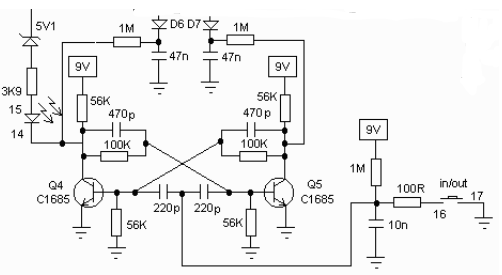
Toggle/T flip-flop is a kind of logic circuit that change it's output state when detecting transition in it's input. An application example of this component is soft power button, that is a push button that acts in sequence of push-on-push-off, just as what we usually seen in stomp box guitar effects and some electronic goods. The circuit below use transistor as main component to replace the necessity of common T/FF logic ICs.
Bowden's Circuit
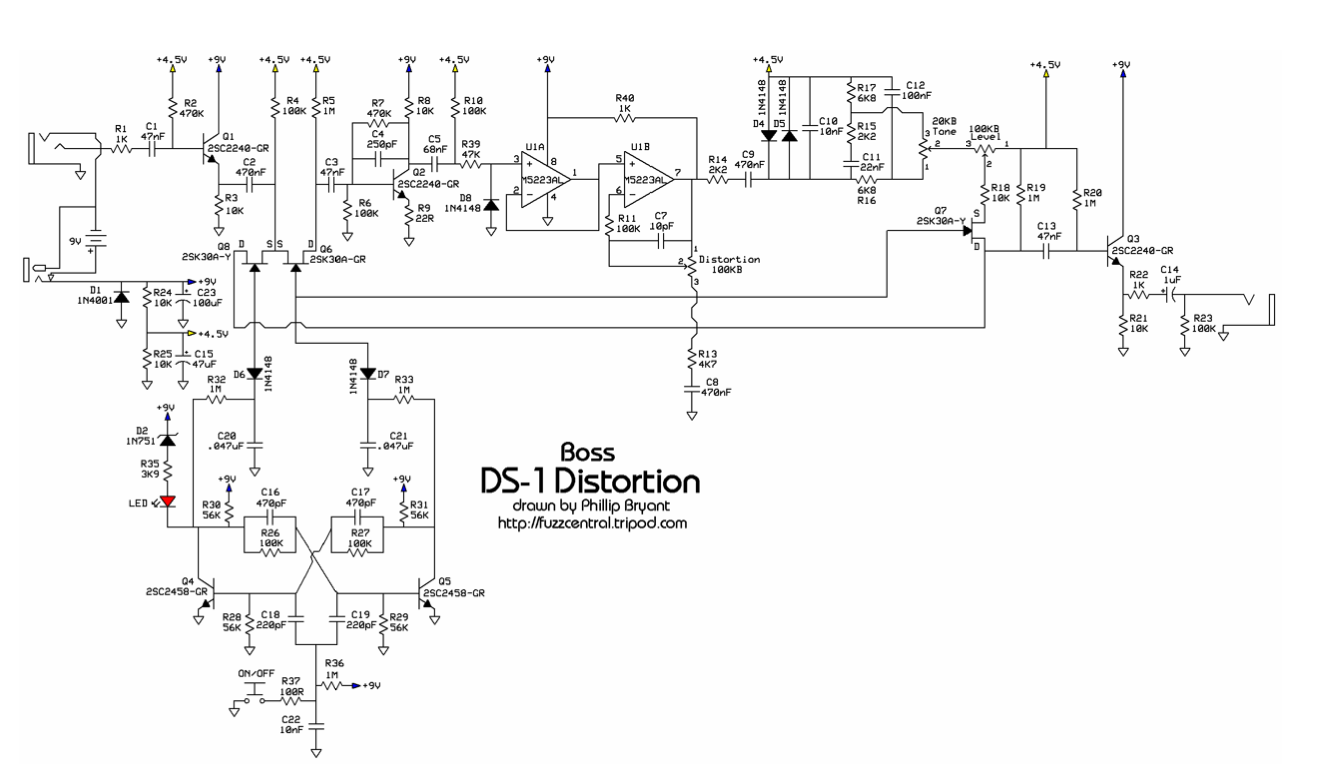
The circuit that is used in stompboxes are a bit different, but they act in the same way. The example bellow can be found in boss DS1 and MT2 effects. Both implement the same circuit.

Toggle switch from MT2 schematic
Toggle switch from DS1 schematic

Reference:

Wednesday, March 14, 2018

555 Toggle Switch

Toggle switch with transistor circuit is common for many applications including stomp box guitar effects. This time I will present the toggle switch based on 555 IC

Reference:
Ref 1
Ref 2

Thursday, July 30, 2015

Rangkaian Kiprok Sepeda Motor (Shunt Regulator)


ref:
Single phase voltage regulator (full wave)

Artikel ini menyambung artikel sebelumnya tentang kiprok honda tiger. Link di bawah ini menarik untuk dipelajari.
 
Link1 (alter)
Link2
Link3
Link4


Tuesday, August 6, 2013

Mini Transistor Audio Amplifier

When I was childhood, I always curious about how electronic circuitry works. I remembered when I wanted to build a transistor audio amplifier, but didn't have any supporting knowledge. Internet hadn't come to my place at that time, not like today. Well, I need some time to build and test all those circuits. Even if I can design a much more complicated circuit than a simple audio amplifier today, but recalling the romance of the past is always exciting. Someday, when knowledge is no longer needed for my work, I will use it for myself fun.

Source:
link1
link2
link3
link4
link5

1. Class AB 4 Transistor Amplifier

2. Class A Headphone amplifier

3. Small audio amplifier circuit diagram


4. Power Amplifier OTL Cassette Radio Booster by TIP41+TIP42

5. Power Amplifier Class A by Transistor


6. Mic/Guitar Compressor with Transistor Bias Control

7. 50 mW 3 Transistors Amplifier


https://www.eleccircuit.com/4-transistor-audio-amplifier-circuit/
https://www.deeptronic.com/electronic-circuit-design/small-audio-power-amplifier-using-3-transistors/
http://www.bowdenshobbycircuits.info/page8.htm